
Sing Karaoke with Synced Lyrics and Play YouTube with the Screen Off
Ground Music now shows time-synced lyrics for YouTube songs. Sing karaoke at home, edit wrong lines, adjust the timing, then turn the screen off and keep listening.
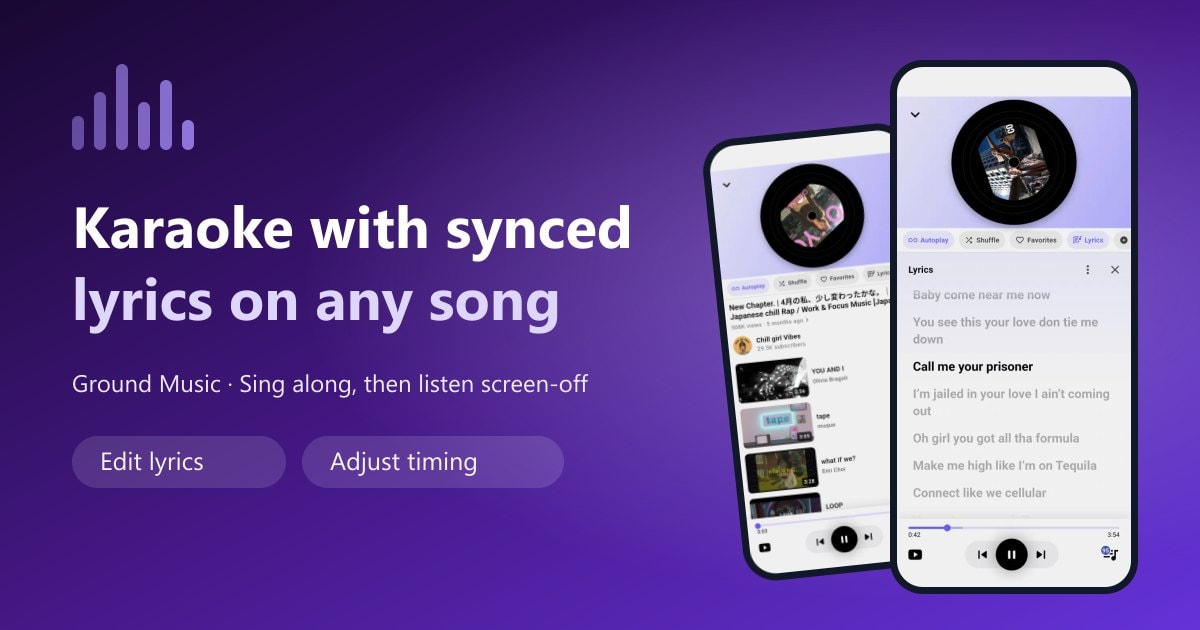
Two things happen when you love a song. First you want to sing it, and you need the words in front of you. Then you want it to keep playing while you cook, commute or fall asleep, and the screen only gets in the way.
Ground Music now does both. The new lyrics feature shows time-synced words that scroll with the music, so any YouTube song turns into a karaoke track. And because Ground Music is built for background playback, the moment you stop looking at the screen the music carries on.
What the new lyrics feature does
Open any song and tap Lyrics in the player. The words appear right below the artwork, and you never leave the app to find them.
- Time-synced scrolling. The line being sung right now is highlighted in dark text while the rest stay grey, so you always know where you are.
- Large, readable type. The text is sized for singing along from an arm's length away, not for squinting.
- Works in both modes. Whether you are watching the music video or listening in audio mode with the spinning vinyl disc, lyrics open the same way.
- One tap to open and close. Lyrics sit next to Autoplay, Shuffle and Favorites in the player's quick actions.
Karaoke at home, with no extra app
A karaoke machine used to mean a separate box, a microphone and a disc of licensed backing tracks. Now the catalogue you need is already on YouTube — every instrumental, every "karaoke version", every acoustic cover — and Ground Music puts the words on top of it.
A simple setup that works:
- Search for the song you want, adding karaoke or instrumental if you want the backing track rather than the original vocals.
- Start playing and tap Lyrics.
- Cast the audio to a Bluetooth speaker so the room fills with sound while you hold the phone as the lyrics screen.
- Queue the next songs with Autoplay or a playlist so the party never stops between tracks.
Because everything runs from one app, there is nothing to buy per song and nothing to download in advance.
When the lyrics are wrong, fix them yourself
Automatically matched lyrics are not always perfect. A line can be misheard, a verse can be missing, or the whole text can drift a second or two ahead of the vocals. Most apps leave you stuck with that. Ground Music gives you two tools instead.
Edit the lyrics
Found a wrong word or a missing line? Edit the text directly and it stays fixed for that song on your device. This matters most for songs that automatic transcription handles badly: regional dialects, mixed-language rap, fast verses and anything with a small audience online.
Adjust timing
If the words are right but arrive early or late, use Adjust timing to shift the whole track of lyrics forward or backward until each line lands on the beat. It takes a few seconds and it is the difference between fumbling and singing confidently.
Both tools are the kind of thing you use once per song and then forget about — your corrections stay in place the next time you play it.
Lyrics and screen-off playback, together
These two features sound contradictory. They are not: they cover the two halves of how people actually listen.
While you are singing, you want the screen on and the words in front of you. The highlighted line does the work of a karaoke prompter.
When you put the phone down, you want the opposite. Lock the screen, drop the phone in your pocket, and the song keeps playing. Ground Music continues playing YouTube audio with the screen off or while you use other apps, and the media notification keeps play, pause, skip, the seek bar and the favourite button within reach on the lock screen.
The practical upshot: you can learn the words to a song during a karaoke session in the evening, then play the same playlist with the screen off on your commute the next morning, without switching apps.
Why screen-off listening saves battery and data
The display is the single hungriest component in a phone. Playing a three-hour lofi mix with the screen lit can drain a battery that would otherwise last all day. Turning the screen off removes that cost entirely.
Audio mode goes further. Instead of decoding and drawing every video frame, Ground Music plays the sound and shows a spinning vinyl disc, which cuts mobile data use on long sessions. For a commute, a gym session or a night of sleep music, that difference adds up.
Tips for a better karaoke session
- Pick the right version. Search results in Ground Music show the channel and duration, so you can tell an official video from a karaoke backing track before you press play.
- Build a karaoke playlist. Save the songs everyone knows into one playlist and hit Play All when guests arrive.
- Use Autoplay as a filler. When the playlist runs out, autoplay radio keeps similar songs coming instead of leaving the room in silence.
- Fix timing once, early. Adjust the timing on the first chorus rather than fighting it for the whole song.
- Follow an artist. Open a channel page to find every song and playlist that artist has published, which is an easy way to fill a themed karaoke night.
Frequently asked questions
Does Ground Music show lyrics for every song?
Lyrics are matched automatically, so coverage is best for popular songs. When a match is wrong or missing, you can edit the text yourself and adjust the timing so it fits.
Can I use it as a karaoke app?
Yes. Search for a karaoke or instrumental version of the song on YouTube, open the lyrics and sing along. A Bluetooth speaker turns it into a room setup.
Do lyrics work when the screen is off?
Lyrics are something you read, so they need the screen on. Playback does not: turn the screen off and the music keeps going in the background, with controls in the notification bar.
Is the lyrics feature free?
Yes. Lyrics, editing, timing adjustment, background playback, playlists and autoplay radio are all free, with no subscription.
Which devices are supported?
Ground Music runs on Android phones and tablets and is available on Google Play. An iOS version is planned.
Get started
Lyrics turn passive listening into singing along, and background playback means the music does not stop when you put the phone down. Together they cover a full day of listening, from a karaoke night to a quiet commute.
Download Ground Music and try the lyrics on your favourite song, or browse all the features first.
Ready to Experience Ground Music?
Download Ground Music now and start listening to YouTube music with screen off completely free!